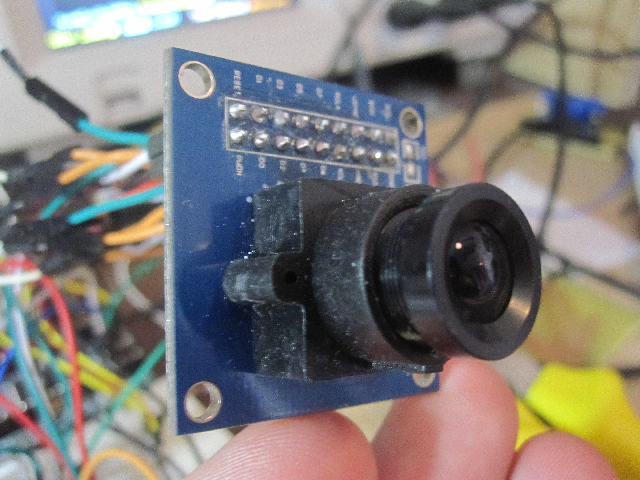
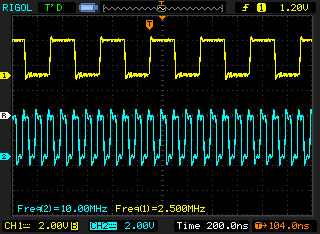
The ov7670 camera sensor, cheaply available from ebay, has been the bane of my existence during my short electronics hobby career. I bought my first ov7670 sensor maybe a year ago, and have been tearing my hair out trying to get it to respond. It seemed completely dead. It didn’t respond to any form of i2c communication, and showed no signs of life in the oscilloscope.
Every now and then, I tried to get it to work using various approaches, but to no avail, and was ready to completely give up. However, now after seeing some recent success stories with the ov7670 here and here, I decided to give it one more go.
I’m pretty new to electronics, and I’m learning new stuff every day. On my most recent attempt at breathing life into the wretched thing, my attention got directed towards a feature I had not even considered before – the XCLK pin. This pin labeled “external clock”, always seemed to me like it was something optional, as I’ve gotten used to all my other toys having internal RC oscillators, or no need for oscillators. But no, in this case it’s not optional, and my oversight seems so obvious now!
I’ve read pretty much every document available on the internet about the ov7670 sensor, but to this day, I’m not sure it’s clearly stated anywhere that feeding the XCLK is an important step to getting the ov7670 up and running. It’s probably listed in every schematic out there, but my newbie mind ignored it.
So, to feed the camera some clockage, I used the CLKOUT feature of the LPCXpresso to generate a frequency of ~10Mhz, and lo and behold, it’s alive! Alive!
From this point on, working with the camera was pretty straightforward. Analyzing the sync signals and reading the digital color signals with the aid of the provided pixel clock was easy as a pie. Some minor headaches with the clock running so fast, but that was possible to tune down to more workable levels.
The smallest resolution the camera supports is QQVGA (160×120), and with rgb565 color space, that fits quite neatly in the 64K of memory that LPC1769 has.
To pump out the image to my computer for viewing, I initially used the semihosting feature of LPCXpresso – just for testing. Printing out the full image with printf’s took nearly an hour! But after a few attempts I managed to conjure a sensible image out of the data, crowning my success with a picture of my stupid face.
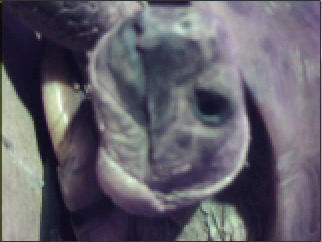
Next step was to output the data via UART at more convenient speeds. Initially I didn’t seem to be able to pump the data to my computer at speeds more than ~57600. Somewhere the data got buffered, and when it buffered enough, it went nuts. So I adjusted the serial protocol a little, so the client sends commands to request lines one at a time, and the lpcxpresso responds with data. This keeps both parties happy about the rate of data flowing, and I was able to increase the baudrate to 921600.
Now I was able to view a new image from the camera every 1-2 seconds. This almost feels like watching a video instead of a slideshow :) I could do some tricks to get faster framerates, but actually I won’t bother. My initial thoughts with the camera were to use it for still images taken on request, and to transfer them wirelessly via XBee, so in future I’ll use the camera at a much slower pace.
In case someone reads this page one day, looking for advise with the ov7670, I’ll list some notes here that might be useful:
- Needs a clock source
- i2c is dodgy, I had to add some delay to read routines
- different versions exist on ebay, some take 2.8V instead of 3.3V, and some have FIFO
I’ve dumped the project source to github at https://github.com/desaster/ov7670test. At the time of writing, the pygame + pyserial client isn’t there, but I might add it later after I work on it a bit.


Can you post the wiring diagram wit voltages and IO names both sides?
Well I’ve taken apart the stuff long time ago already.. but I think the connections should be pretty self explanatory at least on the camera side. And on on the MCU side, it’s really up to you.
I think the source code also has most of the pins explained.
If you’re working on the camera yourself, I’d be very interested in hearing about your experiences with it! :)
hello, good information. But indon know how i will can see the captures images in pc, sended with uart, can you help me?
Regards
For my application, I wrote a python app using pyserial that reads the raw data by using a simple command/response protocol, and then displays the data by using pygame. You can see an example of how I did it in my github repository.
Thank you,
Pytom it,s a stranger for me:) i will seach about this in google..
In a week i will receibe my camera, :)
Thanks, and regards from spain
Hello,
the last friday receibed the camera and today i,m test comonication with sccb bus, with any dificults, but work i think…
Can you help me any more with how to use your aplication for pythom?
Best regards
Hello! I am new to lpc1769 and i have been trying to get the ov7670 camera working. I followed your instructions and used your project source from github. However, when i debug and run the code, I realised that the code doesnt run beyond “while (I2CEngine() == I2CSTATE_SLA_NACK);” under the ov7670_get function. Would appreciate it if you can assist me with the troubleshooting.
Thanks!
Best Regards
I spent a *lot* of time trying to get the i2c working using various microcontrollers, timings, etc. In the end however it wasn’t really the fault of the i2c code, but the way the camera was connected and powered.
Like I wrote in the blog, my biggest obstacle was that I wasn’t providing a clock to the camera (non-FIFO verison that is). Without it, even i2c will not work. However there could be many more reasons, like the i2c connections themselves (pullup resistors).
Maybe if you provided a schematic of your setup, I could see if there’s some obvious fault.
Also, for me, it was very important to have a simpler i2c device to verify that my i2c code and the bus was working properly. I used a simple foolproof i2c eeprom for that.
Thank you for your prompt reply! I have tried figuring out for the past few days but to no avail.
This is the link to the schematic of my setup: https://docs.google.com/document/d/1htmgQO7R7Ofnz7y8e_Dm-VtTWBKdlKjJUCyPvKx6RB8/edit?pli=1
This is the eeprom I am using (24lc512) :
http://sg.element14.com/microchip/24lc512-i-p/eeprom-serial-512k-24lc512-dip8/dp/9758020
This is the camera which I am using(VGA OV7670):
http://www.ebay.com/itm/-/230684824130?item=230684824130&ViewItem=#ht_6726wt_1053
Thank you again for assisting with my troubleshooting. Look forward to your reply soon.
Hey,
I don’t see SIOC and SIOD from the camera connected to the lpc1769. They are the i2c bus that you were having problems with. Or did I misinterpret the drawing?
Your eeprom seems to be connected, but is lacking pullup resistors? Also seems the SCL and SDA should be swapped around (but check this from the lpc1769 datasheet). Did you have your EEPROM working, though?
Thanks! you didnt misinterpret. I forgot to connect those pins! May I know where should SIOC and SIOD be connected to?
What values should I put for my pull-up resistors? I would need to place pull up resistors for both SDA and SCL pins of the eeprom right?
I think I connected the SCL and SDA properly but I drew it wrongly. Sorry about that! I am new to lpc1769, hence thank you for the patience.
Thanks!
I suggest you look up i2c bus on wikipedia for example to learn some basics about what it is about. In ov7670 you use it to modify settings of the camera, an on eeprom you use it to write and read data.
Ov7670 calls the i2c bus “SCCB”.
Your i2c bus should have a pull-up on both wires, and they can be something like 2.2k. I used 10k myself.
i2c bus has two wires: clock and data.
on eeprom: SCL = clock, SDA = data.
on ov7670: SIOC = clock, SIOD = data.
You can connect both these devices to the same i2c bus, and to the same connections in your lpc1769.
Heyy. Thanks for assisting me with the camera! Cam test is working fine now.
For the python code, I installed python 2.7.3 and the dependencies as required. When I run the code, i was shown with this error.
—————————————————————————————————————
Traceback (most recent call last):
File “C:UsersacerDesktopdesaster-ov7670test-14756aautilscamview.py”, line 148, in
Application()
File “C:UsersacerDesktopdesaster-ov7670test-14756aautilscamview.py”, line 108, in __init__
self.serial = SerialPort(self.ov7670, 5, reactor, baudrate=921600)
File “C:Python27libsite-packagestwistedinternet_win32serialport.py”, line 35, in __init__
xonxoff=xonxoff, rtscts=rtscts)
File “C:Python27libsite-packagesserialserialwin32.py”, line 30, in __init__
SerialBase.__init__(self, *args, **kwargs)
File “C:Python27libsite-packagesserialserialutil.py”, line 260, in __init__
self.open()
File “C:Python27libsite-packagesserialserialwin32.py”, line 56, in open
raise SerialException(“could not open port %s: %s” % (self.portstr, ctypes.WinError()))
SerialException: could not open port COM6: [Error 2] The system cannot find the file specified.
>>>
————————————————————————————————————–
Would appreciate if you can assist me with this error, perhaps letting me know where I have gone wrong. Appreciate your help so far! Thanks alot!!
The error is that it can’t open COM6.. is that the correct com port you want to use?
Hi!
I have followed the above entries and your correspondence with JS to fix up my camera. I have installed python and the various dependencies needed in your source code. However, I have experienced this even after reinstalling twisted and pyserial. Did you encounter any of this during your troubleshooting? The link has the image of the error after running the python code.
https://docs.google.com/document/d/1Po1i0hg2q1ypGkwjbADxnX3686LGtpxnF9uCBeDVALk/edit
I have installed the .egg and other packages from .exe files smoothly but just can’t get the python code that you’ve supplied to run. It would be good if you could shed some light on the error.
Thanks for the help!
I’m not sure, but maybe make sure your python2.x and all the dependencies are 32bit versions.
Hi there! Thanks alot for the help. Does it matter if I am using Windows 7 64bit version? Could that be the source of the problem?
The problem could be that you are mixing 64bit python with 32bit libraries. I would just use 32bit version of everything.
hi. nice blog to see. i am using ov7690 with stm32f4. i have manage to read write register settings.
i am using hardware sync.
but the problem is with image data output. I am receiving continuously 0×02.
what can be the problem? it may be clk polarity settings of vsync,hsync, pclk or what?
thanks
I’m not sure how to help you here. How are you reading the image data? Do you have the same non-FIFO model of the camera as I do?
there is dedicated data register in STM32F4 i.e DCMI_DR and dedicated pins for digital output DATA from camera.
I can read and write register settings of camera.and SCCB works fine.
I am continously transmitting the DCMI_DR register every after some micro seconds through USART to PC. (i know i would lost lot of data by this method and I have to use DMA… but the for checking purposes I am directly transmitting the DCMI_DR)
I have checked by manually pull-up and pull-down the different data PINS at STM32F4 . and I got the correct results on my serial. and I got the change in run-time.
but when I connect these PINS to data output of camera, it contnously gives 0×02 on my serial.
may be i am setting the camera register incorrectly OR there is difference between clock polarity settings (vsync,hsync, pclk) of camera and STM32F4?
even if am not setting the register correctly, i think there should be some DATA at least variable DATA on data output PORT of the camera. not only constant 0×02.
=> stm32F4 has bulit-in FIFO.
=> (if i would use DMA ) DMA picks up data from DCMI_DR in STM32F4.
thanks. help required.
if u say i can send main routines of my code.
I don’t have a STM32F4, and I’m not exactly sure what you are doing, but I would be very interested in seeing your code.
Hey thanks for the reply. COM6 is not the port I want to read the values from. Instead, its COM4. Hence, i change your camview.py code at line 108 to self.serial = SerialPort(self.ov7670, 3, reactor, baudrate=921600) as I realised that it will always +1 to the number i put in the line of the code and open the corresponding port. Eg: I put in 3 it will open port 4 which is (3+1). Having successfully open my desired port of which the uart serial usb cable is connected to, I am however still unable to get any image. I am not sure what I miss out, Perhaps asking python to read another port requires more changes to the code than just that line? All it shows is a blank/black pygame screen. You can go to this link to view the pictorial image of what I see.
https://docs.google.com/document/d/1htmgQO7R7Ofnz7y8e_Dm-VtTWBKdlKjJUCyPvKx6RB8/edit?pli=1
I am not sure what could be the problem now, as I have gotten the camtest successful stage as seen in the pic in the link above.
For my uart transfer, I am using a FT232R chip of which I only two connections beside the usb cable to my laptop: I connect TXD of the chip to RXD0/P0.3/(J6-22) of the lpc1769 and RXD of the chip to TXD0/P0.2/(J6-21) of the lpc1769.
I got a feeling my uart0 is not transmitting, hence receiving a blank image. Maybe I miss out on something. Appreciate your help if you can help me spot any obvious errors or let me know what might have gone wrong.
Thank you so much!
Not sure if it matters, but I ran my lpc1769 at 120mhz, while yours seems to be running at 100mhz. Search google for how to change the clock speed, IIRC it requires a small change to system_LPC17xx.c.
Anyways, before even touching the python script, you should verify that the UART communication is working properly by using a serial console manually. Study main.c to learn how the commands work (getimage, getline, regr, regw).
Also, it sounds wrong that your serial chip only has two connections – GND should be connected too!
Heyy thanks for all your help!! I managed to get the image on the pygame display and I have been studying the source code and lpc1769 for the past week to help me understand more about how it works. My camera is getting a new image every 2-3 seconds and I was wondering if you are able to advise if there is any way to increase the frame rate to lets say maybe to the extent of like when you are watching a video/less than 1second per frame? Just wondering if that is possible as I am with limited knowledge and was thinking about whether this is possible or not. Thanks again!!
Well, I increased the FPS by bumping up the UART speed, however at some point you are bound to hit a limit on that.
Generally UART is not the best way to transfer video, though, and I’ve only used it for testing purposes. For a real life application you’d want to use some high speed interface.
hi:
how can I display image receive on hyper terminal?
Hi. nice blog to see. I am using OV7670 moudle(AL422 FIFO witj LD0) with Arduino Mega2560
I just want my camera taken photo and save in registers
I search from net from very long time I can’t found the ans i wanted
Could you help me to solve my problem
THX
Hi Peter,
I now have a FIFO version too, but unfortunately I haven’t gotten around to trying it yet.
Maybe sometime in future I will try it and write a small blog entry about it.. these cameras seem to have gotten really popular lately.
Wrote something on the FIFO version now:
http://qrfnfgre.wordpress.com/2012/10/20/ov7670-fifo-msp430-launchpad/
THX for ur ans i very grateful
if my camera like yours how should i do
do u know hw to do that
THX
For camera like mine, I don’t think any atmega will run fast enough to be able to process the signals. However, I’m not sure how slow the camera clock can be driven..
Here i had the code and data from who sell the camera
could u like to see it
http://www.mediafire.com/?8yr9tgetjabr3ls
THX
Hi. I’m YC and I’m from spain.
I was inspired by your blog and I went ahead to purchase one from ebay to try it out with the lpc1769 that I have lying around. Fortunately (unfortunately), the version I bought came with the FIFO. (Whats the difference btw the FIFO and non-FIFO version? What is the FIFO used for??????????)
I shall try to figure it out too. Looking forward to your future post!
Wrote something on the FIFO version now:
http://qrfnfgre.wordpress.com/2012/10/20/ov7670-fifo-msp430-launchpad/
hi there did you found the way to conquer the question ,yet
if you found the way to solved the question please must be that us know
I really desperate to konw
THX for the helping
I will very greatful
Pingback: OV7670-FIFO + MSP430 Launchpad | qrfnfgre'f oybt
Hello, I have used your project on my lpc1769 board (no eeprom).However, when I run the program it stops at
while (I2CEngine () == I2CSTATE_SLA_NACK). .I did follow the instructions as above add pull-up resistors on but it still fails?
This error is due to non-eeprom?
Please help me solve this problem
thanks.
Hi, the EEPROM I only used as a certainly working i2c example, to rule out other problems with the camera module. Sounds like this would be a great idea in your case as well :)
Unfortunately without a full schematic or illustration of your setup, it’s hard for me to make guesses on what might be wrong…
Thank you for your reply
I used this camera ov7670 module .
http://banlinhkien.vn/goods-1091-camera-ov7670-no-fifo.html.
The schematic of my setup similar to your project I just change the uart speed = 115200 and
it is up FLASH MAGIC TERMINAL to check when I checked it out up “Initializing ov7670 … reset …settings ” then it stops
it stops at ” while (I2CMasterState < 0×100)" in I2CEngine.
THANKS.
Congrats :) It is a real annoying challenge to get this camera work. Actually I ruined a camera before communicating over I2C :) Your article is quite beneficial for those who are confronted by ov7670.
Hi, good job dude,
What was U4 exactly (X_24MHZ)?
Was it a crystal or an IC?
Sorry, what X_24MHZ are you referring to?
Nice job, I have the same problem also, didn’t connect XCLK pin. Now let me try your code.
Thanks.
A question here, It seems those 8 data pins are not used?
Only I2C communication?
/* use these to check if pin is high */
#define ST_D0 (LPC_GPIO2->FIOPIN & (1 <FIOPIN & (1 <FIOPIN & (1 <FIOPIN & (1 <FIOPIN & (1 <FIOPIN & (1 <FIOPIN & (1 <FIOPIN & (1 << 7))
Those definitions may not be used in the code, but the data is certainly read from the GPIO2 port, but it’s done in one single command:
qqvgaframe1[i] = LPC_GPIO2->FIOPIN;
Since qqvgaframe1 is uint8_t (8 bits), only the first 8 pins from FIOPIN will be saved. This is faster than individually reading each pin, and speed is quite important when trying to keep up with the frames.
That said, there may more ways to optimize the reading part, but I didn’t tweak the code much after I got the basic functionality working.
Cannot edit my comment, is I2C used to setup camera, DataPins for image?
Why not just use I2C or data pins?
Could you please help me wiring the OV7670 Camera Module to my MCU ?
By now, I have taken the information from your text
http://s14.directupload.net/images/130204/xjwrrge2.png
I have no idea where (on which Pin of the OV7670) *the date arrives* ?
Does everything work with 3.3 volts, because the V_in pin is labelled 3v3 or is there an other voltage to supply to the data pins?
The image data arrives in parallel from the data pins (D0..D7), clocked by the pixel clock (PCLK). See ov7670 datasheet, Figure 11 for example.
Hello, thank you for the reply.
However, I think my MCU (ATmega328) is not able to create such a high frequency clock (10MHz, T=100ns)
For the clock I am thinking of some procedure like
- set high
- wait 100ns
- set low
- wait 100ns
-
There is XCLK (system clock input) ,CLK , and PCLK – are the frequencies the same?
How can I create such a high frequency clock signal? Datasheet page 6 states 10MHz minimum!
On an AVR, I would probably look into using the CKOUT fuse for generating a fast clock.
However, with a low speed MCU like an atmega, I think you might have some bigger problems.
I was using a pretty powerful MCU at 120mhz, and still keeping up with the data wasn’t easy.
Another issue, where will you store the image data? AFAIK atmegas don’t have a whole lot of memory.
If I were you, I would probably try using one of the FIFO equipped versions of the ov7670 module instead. I’ve written another blog entry on those here: http://www.rpg.fi/desaster/blog/2012/10/20/ov7670-fifo-msp430-launchpad/
Thank you for your help!
ok, I haven’t thought about that issue yet
now I found a way: Using assembler NOP (=> 1 clock cycle on 16mhz = 6.25ns) So I would repeat that 16 times (16*6.25ns=100ns)
Maybe it isn’t even possible with an AVR because of small buffer and relatively low clock speed.
And how do I TRIGGER the camera, I think it is either supplying voltage to some trigger pin or sending some code on an input.
hello, i need help
how configuration ATmega128 microcontroller OV7670 to be displayed to the PC
Do you have his AVR coding?
please help me
Sorry, I don’t have AVR code for you. However, the basic principles are the same for all microcontrollers; initialize the camera with i2c commands, then handle signals with gpio or interrupts.
For AVR, you will probably want to use the FIFO buffered version. See my blog entry here http://www.rpg.fi/desaster/blog/2012/10/20/ov7670-fifo-msp430-launchpad/
Pingback: OV7670-FIFO + MSP430 Launchpad | desaster's blog
hi. tnx for the great pst.
for some time i am trying to communicate with ov7670+FIFO using lpc1768.
I can write 0×80 to register 0×12(to reset the registers) but after that i can’t read any registers.
my code for reading registers:
u8 rdOV7660Reg(u8 regID, u8 *regDat)
{
startSCCB();
if(0==SCCBwriteByte(0×42))
{
stopSCCB();
return(0);
}
DelaySCCB(100);
if(0==SCCBwriteByte(regID))
{
stopSCCB();
return(0);
}
stopSCCB();
DelaySCCB(300);
startSCCB();
if(0==SCCBwriteByte(0×43))
{
stopSCCB();
return(0);
}
DelaySCCB(100);
*regDat=SCCBreadByte();
noAck();
stopSCCB();
return(1);
}
DelaySCCB generate 1us delay.
i have pull up SCL but not SDA (because it is pull-up on the pcb )
Hi, i just got the ov7670 camera module without a FIFO. I also have an eprom M27C512. how do i connect these to the arduino (arduino uno rev3)? and could i just connect the camera pins to a 3g shield (SIM5216E ITEAD 3G shield)?
i want to be able to stream video using the camera. How do i go about connecting and writing code to achieve this.
I have never worked with this camera before and am having a hard time figuring it out.How do i connect the camera, eprom and arduino together to give me an image or video?
please help.